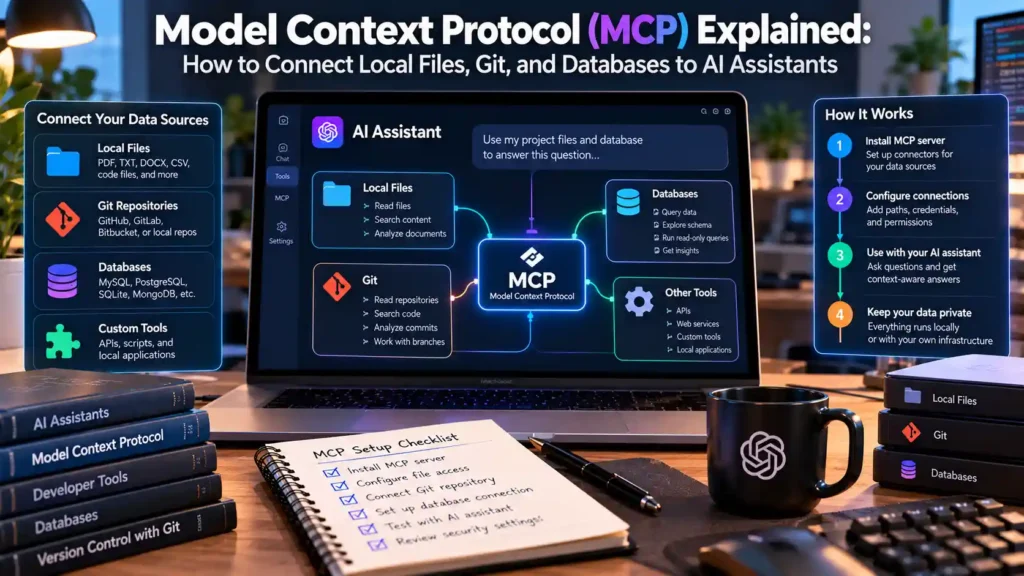
Direct Answer: The Model Context Protocol (MCP)—an open technical standard introduced by Anthropic and documented at modelcontextprotocol.io—connects AI applications (Hosts) to local filesystems, Git repositories, databases, and internal APIs through standardized JSON-RPC 2.0 messages over standard input/output (stdio) or HTTP/SSE. By configuring local MCP servers in your client’s JSON configuration file, you allow an AI assistant to read approved project folders and run scoped tools without manually copy-pasting files into a browser window.
1. How the Model Context Protocol Works: Host, Client, and Server Architecture
Before MCP, every AI IDE and desktop chat app had to write custom, proprietary connectors for Google Drive, GitHub, PostgreSQL, and local filesystems. The Model Context Protocol specification replaces those fragmented integrations with a universal client-server protocol inspired by the Language Server Protocol (LSP) used in modern code editors:
- 1. MCP Host: The user-facing AI application (such as the Claude Desktop app, Cursor, Windsurf, Zed, or Continue.dev) that manages the conversation and enforces user permission prompts.
- 2. MCP Client: The protocol connector inside the Host that maintains a 1-to-1 stateful session with each configured MCP server.
- 3. MCP Server: A lightweight standalone process spawned locally on your computer (via
node,npx,uvx,python, or Docker) that exposes specific data sources or executable actions overstdio(Standard Input / Standard Output) using JSON-RPC 2.0 messages.
Because local MCP servers communicate over stdio pipes as child processes of the Host application, they do not need to open public TCP network ports or expose local web servers.
2. The 3 Core MCP Primitives: Resources, Tools, and Prompts
Every compliant MCP server exposes up to three standardized capability types to the AI client:
| MCP Primitive | Control Model | What It Does | Practical Developer Example |
|---|---|---|---|
Resources (resources://) |
Application-driven / Read-only context | Exposes structured text or binary data that the client can attach as read-only context. | Reading a local schema.sql file, Git commit log, or application error log. |
Tools (tools/call) |
Model-driven (with explicit human user approval) | Executable functions with JSON Schema input validation that perform calculations, queries, or side effects. | Executing a read-only SELECT query on a local SQLite database or creating a new branch in Git. |
Prompts (prompts/get) |
User-driven templates | Pre-configured workflow templates exposed as slash commands or menu items in the Host UI. | A standardized /review-pr-diff prompt that automatically attaches git diff main output. |
3. Step-by-Step Setup: Configuring Local MCP Servers on Windows 11 and macOS
To connect official reference servers from the Model Context Protocol Reference Servers repository—such as the Local Filesystem server and SQLite server—ensure you have **Node.js (v20 LTS or newer)** installed (node --version).
Locate Your Client Configuration File
- Windows 11 (
Claude Desktop):%APPDATA%\Claude\claude_desktop_config.json(e.g.,C:\Users\YourName\AppData\Roaming\Claude\claude_desktop_config.json) - macOS (
Claude Desktop):~/Library/Application Support/Claude/claude_desktop_config.json
Configuration Example for macOS / Linux
{
  "mcpServers": {
    "filesystem": {
      "command": "/opt/homebrew/bin/npx",
      "args": [
        "-y",
        "@modelcontextprotocol/server-filesystem",
        "/Users/yourname/Projects/mindkoo-demo"
      ]
    }
  }
}
Configuration Example for Windows 11 (Avoiding the npx Spawn Bug)
On Windows 11, npx is a .cmd batch wrapper rather than a native .exe binary. Calling "command": "npx" directly inside some JSON-RPC hosts can fail unless invoked via cmd.exe /c or the full path. Alternatively, many Windows developers prefer running Node.js and Python MCP servers inside WSL2 on Windows 11:
{
  "mcpServers": {
    "filesystem": {
      "command": "cmd",
      "args": [
        "/c",
        "npx",
        "-y",
        "@modelcontextprotocol/server-filesystem",
        "C:\\Users\\YourName\\Desktop\\Projects\\mindkoo-demo"
      ]
    }
  }
}
4. Building a Minimal Custom Local MCP Server in Node.js
You can build your own internal tool server in under 35 lines of JavaScript using the official @modelcontextprotocol/sdk package. For example, here is a read-only server that lets your AI assistant check local system memory and uptime safely:
// system-health-mcp.mjs
import { McpServer } from "@modelcontextprotocol/sdk/server/mcp.js";
import { StdioServerTransport } from "@modelcontextprotocol/sdk/server/stdio.js";
import os from "node:os";

const server = new McpServer({
  name: "local-system-health",
  version: "1.0.0"
});

server.tool(
  "get_memory_status",
  "Returns total and free system RAM in megabytes",
  {},
  async () => {
    const totalMB = Math.round(os.totalmem() / (1024 * 1024));
    const freeMB = Math.round(os.freemem() / (1024 * 1024));
    return {
      content: [{
        type: "text",
        text: JSON.stringify({ platform: os.platform(), totalMB, freeMB, uptimeHours: +(os.uptime() / 3600).toFixed(2) })
      }]
    };
  }
);

const transport = new StdioServerTransport();
await server.connect(transport);
5. Security Best Practices: Directory Root Scoping and Consent Prompts
Because local MCP servers execute with your user account’s OS permissions, follow three strict security rules:
- Scope Filesystem Roots Narrowly: Never pass your entire home directory (
C:\Users\YourNameor/Users/yourname) to@modelcontextprotocol/server-filesystem. Pass only the specific project subfolder you want the AI to access, and review our guide on preventing AI assistants from accessing .env files and SSH keys. - Inspect Every Tool Call Before Clicking “Allow”: Do not enable “Always Allow” for destructive tools (
write_file,execute_command, or databaseDELETE/UPDATEqueries). - Audit Third-Party MCP Packages: Pin exact package versions instead of running unverified community npm packages with
-y. To see how MCP fits into broader developer workflows, read our guide comparing Claude and ChatGPT for software engineering workflows.
6. Troubleshooting Common MCP “Server Disconnected” and ENOENT PATH Errors
- Error:
spawn npx ENOENTon macOS: macOS GUI applications launched from Spotlight or the Dock do not inherit your terminal’s~/.zprofilePATH. Always specify the absolute binary path (/opt/homebrew/bin/npxon Apple Silicon or/usr/local/bin/npxon Intel Macs). - Error:
Unexpected token in JSON/ CorruptstdioStream: When writing a custom MCP server, **never useconsole.log()for debugging**, becauseconsole.logwrites tostdoutand corrupts the JSON-RPC 2.0 message stream. Always write diagnostic logs toconsole.error()(stderr).
Verified Primary Sources & Official Documentation
| Source Name | Source Type | Supported Technical Claim | Verification Status |
|---|---|---|---|
| Model Context Protocol (MCP) Official Specification & Documentation | Official Technical Standard Documentation | Supports Host-Client-Server architecture, JSON-RPC 2.0 stdio transport, and Resources/Tools/Prompts primitives. | Verified via live web search (2026-10-27) |
| Model Context Protocol Reference Servers Repository | Official GitHub Repository | Supports `@modelcontextprotocol/server-filesystem` configuration arguments and root directory scoping. | Verified via live web search (2026-10-27) |