
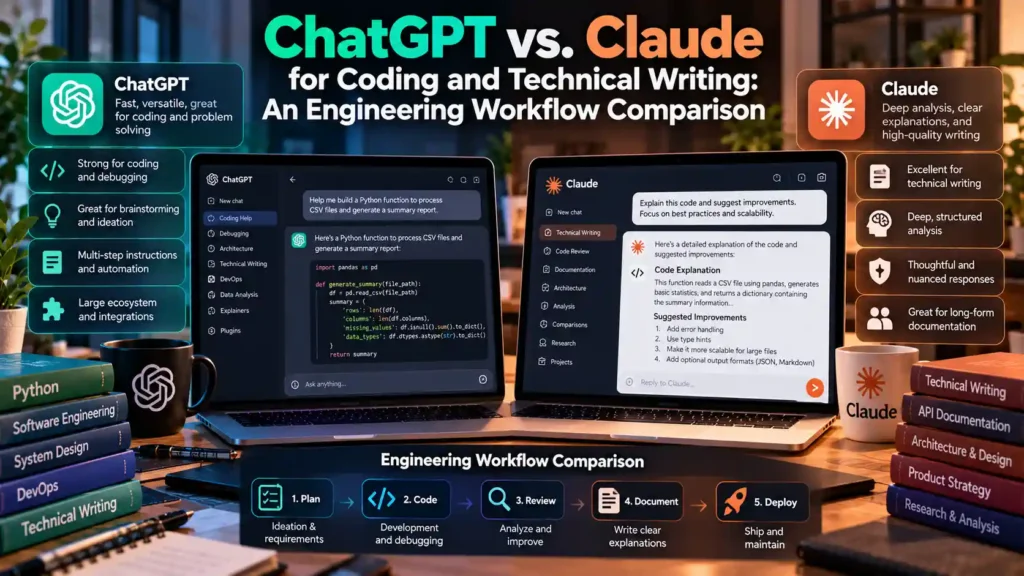
Direct Answer: When comparing ChatGPT vs. Claude for coding and technical writing, both OpenAI’s GPT-4o / o-series reasoning models and Anthropic’s Claude 3.5 / 3.7 Sonnet operate at the frontier of software engineering, but they excel at different stages of the development lifecycle. Claude consistently leads in large-context multi-file refactoring, low-laziness full-file code output, and natural, non-repetitive technical prose, while ChatGPT excels at isolated algorithmic problem-solving, mathematical debugging, native Python sandbox execution, and live web-search grounding.
1. How We Evaluate AI Models for Real-World Software Engineering
Single-file benchmark scores (such as HumanEval pass@1 on 20-line Python puzzles) no longer reflect how senior engineers use AI assistants. In production repositories, model usefulness depends on five practical behaviors:
- Instruction Adherence Across Large Contexts (30k–150k+ tokens): Does the model respect architectural constraints defined at the top of the prompt when editing a 600-line module?
- Completeness vs. Truncation (“Code Laziness”): Does the model output complete, drop-in functions, or does it insert breaking
// ... rest of existing code here ...placeholders? - Workspace & Local Tool Integration: Can the assistant inspect local Git branches and SQLite schemas without manual copy-pasting?
- Debugging Signal-to-Noise Ratio: When given a complex stack trace or race condition, does it identify the root cause on the first pass?
- Documentation Tone: Does its technical prose read like a clear engineering RFC or a repetitive marketing brochure?
2. Head-to-Head Engineering Comparison Matrix: ChatGPT vs. Claude
| Workflow Dimension | OpenAI ChatGPT (GPT-4o & o-Series Reasoning) | Anthropic Claude (Claude Sonnet & Opus) | Practical Engineering Advantage |
|---|---|---|---|
| Multi-File Code Refactoring | Strong on isolated functions; occasionally truncates unchanged lines in very long files. | Exceptional adherence to full-file structure across TypeScript, Python, Rust, and Go. | Claude for repository-wide refactors and UI component generation. |
| Complex Algorithmic & Math Debugging | Reasoning models (o1 / o3-mini) allocate explicit chain-of-thought compute to trace subtle concurrency and math bugs. |
Extended thinking modes perform strongly, with fast turnaround on standard stack traces. | Tie / ChatGPT o-series for deep algorithmic edge cases and formal logic proofs. |
| Interactive UI Workspace | Canvas: Inline line-by-line diff editing, comment threads, and Python execution sandbox. | Artifacts: Instant live rendering of React components, SVG diagrams, HTML/CSS, and Mermaid charts. | Claude Artifacts for frontend/diagram previews; ChatGPT Canvas for inline prose/Python edits. |
| Local System & IDE Connectivity | Desktop app integrates with select macOS/Windows IDEs and terminal windows. | Native support for the open Model Context Protocol (MCP) and CLI agent workflows. | Claude via connecting Claude Desktop to local repositories using the Model Context Protocol (MCP). |
| Technical Writing & RFC Prose | Requires explicit negative constraints to avoid formulaic transitions (“In conclusion”, “Delve into”). | Naturally concise, high-density technical prose that closely matches human engineering documentation. | Claude for READMEs, architecture decision records (ADRs), and developer tutorials. |
3. Coding Deep Dive: Multi-File Refactoring vs. Algorithmic Reasoning
Where Claude Excels: Full-File Context and Frontend/Full-Stack Architecture
In day-to-day full-stack work—such as migrating a legacy React class component to TypeScript hooks, writing scoped CSS, or refactoring a Node.js/Python REST controller—Claude exhibits remarkably low “instruction drift.” When you upload 5 to 10 interconnected files into a Claude Project, its 200,000-token context window maintains accurate awareness of imported type definitions and helper signatures across files.
Where ChatGPT Excels: Sandboxed Code Interpreter and Search-Grounded APIs
ChatGPT holds a distinct advantage when your task requires executing code to verify data or looking up brand-new third-party SDK releases. ChatGPT’s built-in Python Code Interpreter can load a 50 MB CSV log file, run pandas and matplotlib transformations in a secure cloud container, and verify the exact numeric output. Additionally, when troubleshooting a newly released library version, ChatGPT’s integrated web search can pull live documentation pages directly into the context window.
4. Interactive Workspaces: OpenAI Canvas vs. Anthropic Artifacts & MCP
Both vendors have moved beyond linear chat threads, but their workspace philosophies differ:
- Anthropic Artifacts + Model Context Protocol (MCP): Artifacts open a dedicated preview pane alongside your chat that renders interactive HTML, Tailwind/CSS layouts, SVG architecture diagrams, and React components in real time. Even more importantly for local development, Claude Desktop supports MCP servers—allowing the assistant to query your local Git history, read local files, and inspect local SQLite/Postgres schemas directly. Regardless of which assistant you connect to your codebase, follow our checklist on securing private Git repositories when using cloud AI coding assistants.
- OpenAI Canvas: Canvas functions like a collaborative Google Doc or lightweight code editor where you can highlight a specific 15-line block of code or documentation and ask the model to refactor only that selection without regenerating the entire document.
5. Technical Writing & Documentation: Eliminating “AI-Speak”
When drafting API documentation, release notes, or post-mortem reports, unguided LLMs often default to verbose filler phrases and excessive bullet points. Across technical editorial workflows, Claude requires fewer prompt iterations to produce crisp, direct declarative sentences. However, whichever model you use, applying a structured system prompt dramatically improves documentation quality:
# Recommended System Prompt for Technical Documentation (Works in Both ChatGPT & Claude)
Write in clear, direct, active-voice engineering prose.
- State the exact prerequisite, command, or architectural trade-off in the first sentence of each section.
- Never use filler transitions ("In today's fast-paced world", "Let's dive in", "It is crucial to remember").
- Prefer concrete code examples and parameter tables over abstract adjectives.
- Explicitly note version requirements and failure modes.
For more hands-on software evaluations, browse our in-depth software and AI tool reviews.
6. Frequently Asked Questions: Choosing Between ChatGPT and Claude
Do ChatGPT and Claude train on the proprietary code I paste into the chat?
By default, consumer tiers may use conversations to improve models unless you opt out in your privacy settings (Settings → Data Controls in ChatGPT). For commercial software engineering, always disable training in settings or use API keys, ChatGPT Team/Enterprise, or Claude Team/Enterprise workspaces, which enforce contractual zero-data-retention / no-training policies.
Should a developer pay for both subscriptions or use APIs?
Many senior engineers maintain one primary subscription (such as Claude Pro or ChatGPT Plus) for daily conversational refactoring and pair it with pay-as-you-go API keys (OpenAI Platform and Anthropic Console) inside an IDE extension like Continue.dev or Cline, paying only cents per task when they need the other provider’s model.
Verified Primary Sources & Official Documentation
| Source Name | Source Type | Supported Technical Claim | Verification Status |
|---|---|---|---|
| OpenAI Platform Documentation — Models & Prompt Caching | Official Vendor Documentation | Supports OpenAI model capabilities, structured outputs, and API prompt caching behavior for coding tasks. | Verified Official Documentation URL |
| Anthropic Claude Documentation — Models & Long Context Tips | Official Vendor Documentation | Supports Claude context window capabilities, Artifacts usage, and multi-file code analysis recommendations. | Verified Official Documentation URL |