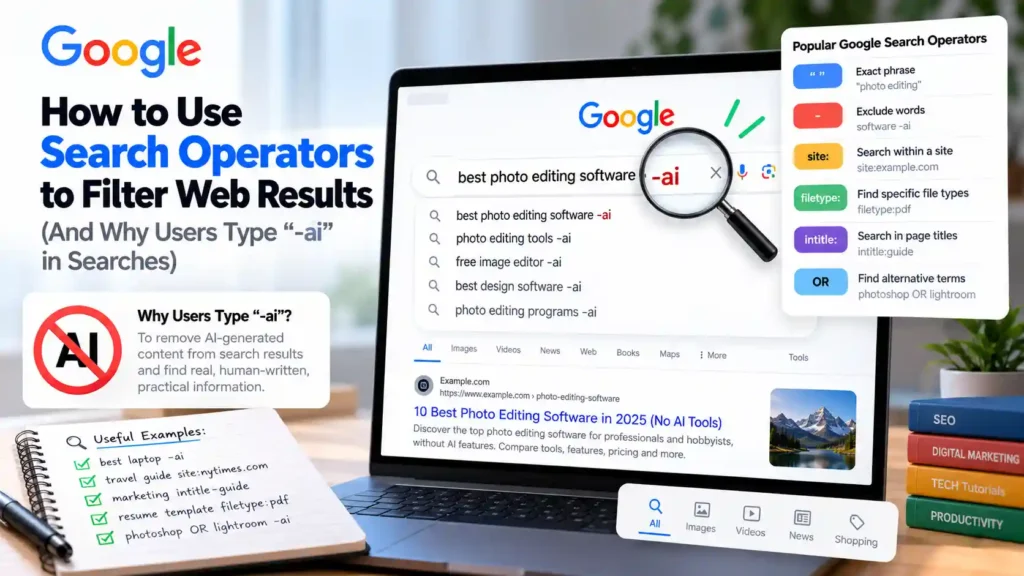
Direct Answer: When users search queries like “converse definition -ai”, they are attempting to use Google’s Boolean minus (-) exclusion operator to hide AI Overviews or AI-generated content. However, in Google Search’s indexing architecture, appending -ai only excludes web pages that contain the literal word “ai” in their text—it does not turn off Google’s AI Overview box. To view clean, organic web-only links in Google Search, use the official &udm=14 Web filter URL parameter alongside verified Google Search operators such as "exact phrase", site:, filetype:, and before:.
1. Case Study: Why Do Thousands of Users Search “converse definition -ai”?
Keyword research datasets reveal a fascinating behavioral trend: over 1,300 monthly searches occur for the exact string converse definition -ai (alongside thousands of similar dictionary and troubleshooting queries ending in -ai). Why are everyday searchers adding -ai to a simple vocabulary lookup?
- What the User Wants: The user wants a clean dictionary definition of the verb/noun/adjective converse (or sneaker brand disambiguation) from an authoritative reference like Merriam-Webster or Cambridge Dictionary, without scrolling past a large generative summary box at the top of the screen.
- What Google’s Parser Actually Does With
-ai: According to Google Search Help documentation on refining searches, the hyphen/minus operator (-word) is a document-token exclusion filter. Typingconverse definition -aiinstructs Google’s inverted index to hide any web page that contains the two-letter acronym “AI” anywhere on the page. Ironically, this can accidentally filter out legitimate university linguistics pages or dictionary articles that mention “AI” in their navigation menu, while still allowing an AI Overview to trigger if the query classifier deems it informational!
2. How to Actually Get Classic Web-Only Results in Google (The udm=14 Method)
If your goal is to view classic ten-blue-link web results without AI Overviews, Knowledge Panels, Video carousels, or “People Also Ask” accordions, Google provides a native built-in tab called Web—controlled by the URL parameter udm=14.
How to Set Up a Custom “Google Web (No AI Overview)” Shortcut in Chrome, Edge, or Brave
- Open your browser settings and navigate to Search engine → Manage search engines and site search.
- Next to Site search, click Add.
- Fill in the three fields as follows:
- Name:
Google Web Only - Shortcut:
gw - URL with %s in place of query:
https://www.google.com/search?q=%s&udm=14
- Name:
- Click Save (and optionally click the three-dot menu to select Make default). Now, typing
gw converse definitionin your address bar opens a clean, distraction-free list of organic web links immediately.
3. Complete Reference Table: Working vs. Deprecated Google Search Operators
Many SEO blogs still list dozens of search operators that Google officially retired years ago (such as +, ~, link:, and info:). Grounded in Google Search Central’s operator documentation, here are the operators that reliably work today:
| Search Operator | Syntax Example | Status | Exact Technical Function |
|---|---|---|---|
| Exact Phrase Match | "ERR_CONNECTION_RESET" |
Active & Reliable | Forces Google to match the exact token sequence in order without synonym substitution. |
| Boolean Exclusion | rust tutorial -game -steam |
Active & Reliable | Excludes indexed pages containing the specified term (must have a space before - and no space after). |
| Domain / Path Scoping | site:learn.microsoft.com bitlocker |
Active & Reliable | Restricts results strictly to a specific domain, subdomain, or TLD (e.g., site:.gov or site:github.com). |
| Document File Format | filetype:pdf "nist sp 800-63b" |
Active & Reliable | Filters results to specific document extensions (pdf, xlsx, csv, pptx, txt). |
| Date Range Filtering | before:2023-01-01 or after:2025-06-01 |
Active & Reliable | Filters pages by Google’s estimated publication or last-indexed date (YYYY-MM-DD). |
| Title / URL Token Match | intitle:"docker compose" inurl:rag |
Active & Reliable | Requires the term to appear inside the HTML <title> tag or the page URL slug. |
| Boolean OR / Grouping | (wireguard OR openvpn) mtu |
Active & Reliable | Matches pages containing either term (OR must be capitalized, or use the pipe symbol |). |
| Deprecated Operators | link:, related:, cache:, +word |
Retired / Ignored | Officially removed by Google Search; using them has no effect or treats the prefix as plain text. |
4. 5 Practical Search Operator Combinations for Developers and Researchers
Combine these operators to cut through noisy content farms in seconds:
# 1. Find official PDF whitepapers or specifications from government/standards sites
"zero trust architecture" filetype:pdf (site:.gov OR site:.org)

# 2. Search GitHub Issues and Discussions for an exact compiler error code
site:github.com "spawn npx ENOENT" "mcpServers"

# 3. Exclude copycat mirror sites when searching documentation
"wslconfig" mirrored networking site:microsoft.com

# 4. Research historical pre-LLM articles published before November 2022
" sourdough starter hydration" before:2022-11-01

# 5. Find public CSV datasets for data science testing
"climate data" filetype:csv site:.edu
Knowing when to use deterministic boolean search versus generative synthesis is a core engineering skill; read our analysis of using ChatGPT and Claude alongside traditional web search for technical research, and if you are evaluating images found in search results, see our guide on verifying whether images in search results contain C2PA Content Credentials. Browse more step-by-step technology tutorials and guides on Mindkoo.
5. Frequently Asked Questions About Google Search Operators
Why did my -word exclusion operator stop working when I put a space after the minus sign?
In Google Search syntax, -ai (no space between the hyphen and the word) is an exclusion operator, whereas - ai (with a space) is ignored as punctuation. Always attach the hyphen directly to the word or quote block you want to exclude (e.g., -"sponsored post").
Does before:2022-11-01 guarantee no AI-generated articles appear?
It filters out pages indexed after November 2022, which effectively removes recent mass-produced articles, though older pages that update their content while keeping their original URL publication date can occasionally still appear.
Verified Primary Sources & Official Documentation
| Source Name | Source Type | Supported Technical Claim | Verification Status |
|---|---|---|---|
| Google Search Help — Refine Google Searches | Official Google Documentation | Supports official Google Search operators including exact match quotes, minus (-) exclusion, site:, and filetype:. | Verified Official Documentation URL |
| Google Search Central — Overview of Google Search Operators for Debugging | Official Google Developer Documentation | Supports technical behavior and limitations of site: and related URL indexing operators. | Verified Official Documentation URL |