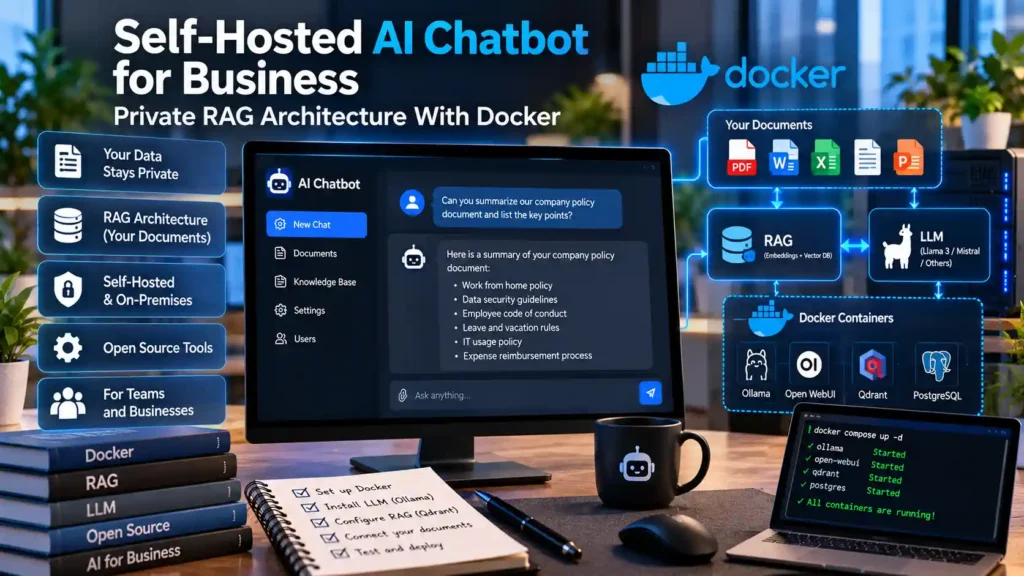
Direct Answer: To build a production-ready self-hosted AI chatbot for business, deploy a containerized Retrieval-Augmented Generation (RAG) stack using Docker Compose that pairs a local inference engine (Ollama or vLLM), a high-performance vector database (Qdrant), and a role-based workspace interface (Open WebUI). This architecture keeps 100% of company PDFs, wikis, and user prompts inside your own Linux server or private VLAN with zero recurring per-token API fees.
1. Reference Architecture: The 4-Layer Private Business RAG Stack
Organizations that choose not to purchase turnkey on-premises AI appliances like Zanus AI can build an equally private, vendor-neutral system using open-source infrastructure. A modular self-hosted business chatbot consists of four decoupled services:
- 1. Inference Engine (
OllamaorvLLM): Executes open-weight language models (such as Qwen 2.5, Llama 3.1/3.3, or Mistral Small) on local NVIDIA GPUs. Use Ollama for rapid single-server setups (1–15 concurrent users) or vLLM with PagedAttention continuous batching for high-concurrency enterprise teams (20–100+ concurrent users). - 2. Embedding & Reranking Pipeline (
BAAI/bge-m3+bge-reranker-v2-m3): Converts internal documents and user queries into dense and sparse vectors locally without calling OpenAI’s embedding API. - 3. Vector Database (
Qdrant): Stores document chunks alongside metadata payloads (department,security_clearance,source_url,updated_at) for sub-millisecond filtered retrieval. - 4. Frontend & Orchestration Layer (
Open WebUI): Provides an authenticated chat interface, document upload manager, citation viewer, and Role-Based Access Control (RBAC).
2. Server Hardware & GPU Sizing by Team Concurrency
Unlike single-user desktop inference, a business server must handle multiple employees submitting queries simultaneously while leaving enough VRAM for the KV-cache context window and local embedding model. For a deeper dive into single-workstation quantization math, see our guide on sizing GPU VRAM and configuring Ollama quantization formats.
| Organization Tier | Concurrent Active Users | Recommended GPU Hardware | System RAM & Storage | Recommended Model & Inference Engine |
|---|---|---|---|---|
| Small Team / Department (10–25 staff) | 1–4 simultaneous requests | 1× NVIDIA RTX 4090 (24 GB VRAM) or RTX 5090 (32 GB VRAM) | 64 GB DDR5 RAM, 1 TB NVMe SSD | 14B–32B parameter model (Q4_K_M) via Ollama (OLLAMA_NUM_PARALLEL=4) |
| Mid-Market Company (25–150 staff) | 5–15 simultaneous requests | 1× NVIDIA RTX 6000 Ada (48 GB) or 2× RTX 3090/4090 (48 GB total) | 128 GB ECC RAM, 2 TB Enterprise NVMe | 32B–70B AWQ/FP8 model via vLLM with continuous batching |
| Enterprise Production (150+ staff) | 20–60+ simultaneous requests | 2× NVIDIA L40S (96 GB total) or H100 NVL | 256 GB ECC RAM, RAID-1 NVMe array | 70B FP8 model via vLLM + dedicated CPU/GPU node for Qdrant & BGE Reranker |
3. Step-by-Step Deployment: Production Docker Compose Configuration
Assuming an Ubuntu 24.04 LTS host (or a Windows Server / Windows 11 workstation after configuring WSL2 with NVIDIA CUDA passthrough for Docker containers) with the NVIDIA Container Toolkit installed, create a dedicated directory /opt/mindkoo-business-rag and save the following docker-compose.yml file:
version: "3.9"

services:
  qdrant:
    image: qdrant/qdrant:latest
    container_name: mk-qdrant
    restart: unless-stopped
    ports:
      - "127.0.0.1:6333:6333"
    volumes:
      - ./qdrant_storage:/qdrant/storage
    networks:
      - rag-internal

  ollama:
    image: ollama/ollama:latest
    container_name: mk-ollama
    restart: unless-stopped
    environment:
      - OLLAMA_NUM_PARALLEL=4
      - OLLAMA_MAX_LOADED_MODELS=2
      - OLLAMA_FLASH_ATTENTION=1
    volumes:
      - ./ollama_models:/root/.ollama
    deploy:
      resources:
        reservations:
          devices:
            - driver: nvidia
              count: all
              capabilities: [gpu]
    networks:
      - rag-internal

  open-webui:
    image: ghcr.io/open-webui/open-webui:main
    container_name: mk-open-webui
    restart: unless-stopped
    ports:
      - "127.0.0.1:3000:8080"
    environment:
      - OLLAMA_BASE_URL=http://ollama:11434
      - VECTOR_DB=qdrant
      - QDRANT_URI=http://qdrant:6333
      - ENABLE_RAG_HYBRID_SEARCH=true
      - RAG_EMBEDDING_ENGINE=ollama
      - RAG_EMBEDDING_MODEL=bge-m3:latest
      - WEBUI_AUTH=true
      - ENABLE_SIGNUP=false
      - SCARF_NO_ANALYTICS=true
      - DO_NOT_TRACK=true
    volumes:
      - ./open_webui_data:/app/backend/data
    depends_on:
      - ollama
      - qdrant
    networks:
      - rag-internal

networks:
  rag-internal:
    driver: bridge
Pulling the Inference and Embedding Models
Start the stack and download both a local embedding model (bge-m3) and an instruction-tuned language model (qwen2.5:14b or llama3.1:8b) inside the isolated container network:
docker compose up -d
docker exec -it mk-ollama ollama pull bge-m3:latest
docker exec -it mk-ollama ollama pull qwen2.5:14b
4. Optimizing Retrieval Quality: Semantic Chunking, Hybrid Search, and Reranking
The #1 reason self-hosted business chatbots give incomplete answers is naive document chunking. If you split a financial table or troubleshooting procedure arbitrarily every 500 characters, the header row is separated from the data rows.
- Recommended Chunk Size & Overlap: Configure a chunk size of 800 to 1,200 tokens with a 150-token overlap, using Markdown-aware splitters so headings (
#,##,###) remain attached to their paragraphs. - Enable Hybrid Search (
ENABLE_RAG_HYBRID_SEARCH=true): Pure vector similarity struggles with exact part numbers, error codes (ERR_SSL_VERSION_OR_CIPHER_MISMATCH), and SKU strings. Hybrid search combines dense vector embeddings with BM25 keyword matching and a cross-encoder reranker to surface exact technical matches.
5. Enforcing Document-Level Access Control (RBAC) and Air-Gapped Security
Notice in the docker-compose.yml above that ENABLE_SIGNUP=false is enforced and ports are bound to 127.0.0.1 (to be placed behind an internal Nginx/Caddy TLS reverse proxy or WireGuard VPN). Inside Open WebUI’s Admin Panel (Admin Settings → Users → Groups), create distinct permission groups—such as Engineering, Sales, and HR—and assign each document Knowledge Base exclusively to its authorized group so an employee in one department cannot retrieve passages from restricted collections.
6. Troubleshooting Common Self-Hosted RAG Bottlenecks
- Symptom: Chatbot Truncates Long Documents or Forgets Uploaded Context: Ollama defaults to a 2,048-token context window unless overridden. In Open WebUI (
Admin Settings → Models → Advanced Params), increasenum_ctxto8192or16384so retrieved document chunks are not silently dropped. - Symptom: Slow First-Token Latency When Multiple Users Query Simultaneously: Verify
OLLAMA_NUM_PARALLELmatches your available VRAM, or migrate the inference container from Ollama tovllm/vllm-openai:latestfor high-throughput PagedAttention scheduling.
Verified Primary Sources & Official Documentation
| Source Name | Source Type | Supported Technical Claim | Verification Status |
|---|---|---|---|
| Qdrant Vector Database Documentation | Official Open-Source Documentation | Supports payload filtering, HNSW indexing, and role-based tenant isolation in self-hosted RAG pipelines. | Verified Official Documentation URL |
| vLLM Official Documentation | Official Open-Source Documentation | Supports PagedAttention continuous batching for high-concurrency multi-user business LLM inference. | Verified Official Documentation URL |
| Open WebUI Official Documentation | Official Open-Source Documentation | Supports offline Docker deployment, local RAG document ingestion, and RBAC user permissions. | Verified Official Documentation URL |